Insight Listener Metric Terminology
Term |
Definition |
Notes |
ETC |
Marketing Industry Jargon Equivalent |
Report Type |
|
|||
|
Listeners |
Listenership statistics |
|
|
|
|
|
|
|
|
|
Group By Date |
|
|||
|
None |
Data will not be grouped by any date |
|
|
|
|
Day |
Data will be grouped by day |
|
|
|
|
Week |
Data will be grouped by week |
Listed by first day of the week |
|
|
|
Month |
Data will be grouped by month |
Listed by first day of the month |
|
|
|
|
|
|
|
|
Metrics - Metrics options will change with the report type chosen. |
|
|||
Listeners Report Metrics |
|
|||
|
Bandwidth (GB) |
|
|
|
|
|
CUME (1 min) |
Number of unique listeners connected for an average of 1 minute |
|
|
|
|
CUME (15 min) |
Number of unique listeners connected for an average of 15 minutes |
|
|
|
|
CUME (5 min) |
Number of unique listeners connected for an average of 5 minutes |
|
|
|
|
Total Listener Hours |
Total hours of all listeners |
|
|
|
|
Total Sessions |
Total session connections |
|
|
|
Dimensions - Dimensions will change with the report type chosen. Please note - some Dimensions are only available as a Filter and are listed in the Filter Section |
||||
Listeners Report Dimensions |
|
|||
|
Client Age |
Age of listener |
|
|
|
|
Client Device App Name |
Name of app listener used to connect to stream |
|
|
|
|
Client Device Brand |
Brand name of listener’s device |
Samsung, Amazon, TCL, Razer, Apple, Sonos etc. |
|
|
|
Client Device Browser |
Browser listener used to connect to stream |
Chrome, Firefox, Edge, Safari etc. |
|
|
|
Client Device Browser Version |
Version of browser listener used to connect to stream |
|
|
|
|
Client Device Class |
Class of device listener used to connect to stream |
Desktop, Mobile, Unknown, etc. |
|
|
|
Client Device is OTT |
Device listener used to connect to stream uses OTT |
|
|
|
|
Client Device is Robot |
|
|
|
|
|
Client Device Name |
Name of device listener used to connect to stream |
Apple iPhone, Google Pixel, LG Reflect, Motorola Moto Z Droid, Samsung Galaxy A6 etc. |
|
|
|
Client Device OS |
Operating system of device listener used to connect to stream |
Android, Linux, webOS TV, iOS, Fire OS, Roku OS etc. |
|
|
|
Client Device OS Version |
Version of device operating system listener used to connect to stream |
|
|
|
|
Client Device Type |
Type of device listener used to connect to stream |
MobileAndroid, MobileIpad, PcWindows, PcMac, MobileIphone etc. |
|
|
|
Client Gender |
Gender of client |
|
|
|
|
Client Geo City |
City name where listener was reported to be when connected to stream |
|
|
|
|
Client Geo Country |
Country name where listener was reported to be when connected to stream |
|
|
|
|
Client Geo DMA Name |
Nielson DMA (Designated Market Area) where listener was reported to be when connected to stream |
Report will include ClientGeoDMAID when making this selection |
|
|
|
Client Geo RMSA |
RMSA (Metropolitan Statistical Area) where listener was reported to be when connected to stream |
|
MSAs are determined by the United States Census Bureau |
|
|
Client Geo Region |
Geographical region where listener was reported to be when connected to stream |
Region is returned as a State -WA, NY, FL etc. |
|
|
|
Client Geo Zip |
Zip code where listener was reported to be when connected to stream |
Zip codes that start with a 0 are returned without the leading 0. 08596 returns as 8596 |
|
|
|
Client Lang Code |
Assumed Language of listener |
Returns a string that includes 2 letter language code, sometimes including country origin of
language
|
|
|
|
Client Source |
Source of stream listener was connected to |
|
Source codes are normally added to the end of a stream URL to track where the stream a listener connected to originated from. |
|
|
Client Stream URL |
URL of stream listener was connected to |
|
|
|
|
Client Us Privacy |
Information used to determine whether or not we are allowed to process the consumer’s personal data |
Reported via string starting with a number that signifies Privacy String version, followed by 3 non-numerical values: Y,N,- , which signify what information is allowed to be used |
|
|
|
Date |
|
|
|
|
|
Date - Month |
|
|
|
|
|
Date - Week |
|
|
|
|
|
Session Duration (sec) |
Record of session length in seconds |
|
|
|
|
Session End Date SLT |
Day listener’s session ended in Station Local Time |
SLT is the time where the station is physically located |
|
|
|
Session End Date UTC |
Day listener’s session ended in Universal Time Coordinated |
UTC is sometimes referred to as GMT |
|
|
|
Session End Month SLT |
Month listener’s session ended in Station Local Time |
|
|
|
|
Session End Month UTC |
Month listener’s session ended in Universal Time Coordinated |
|
|
|
|
Session End Week SLT |
Week listener’s session ended in Station Local Time |
|
|
|
|
Session End Week UTC |
Week listener’s session ended in Universal Time Coordinated |
|
|
|
|
Session Rewind Duration (Sec) |
|
|
|
|
|
Session Start Date SLT |
Day listener’s session started in Station Local Time |
|
|
|
|
Session Start Date UTC |
Day listener’s session started in Universal Time Coordinated |
|
|
|
|
Session Start Month SLT |
Month listener’s session started in Station Local Time |
|
|
|
|
Session Start Month UTC |
Month listener’s session started in Universal Time Coordinated |
|
|
|
|
Session Start Week SLT |
Week listener’s session started in Station Local Time |
|
|
|
|
Session Start Week UTC |
Week listener’s session started in Universal Time Coordinated |
|
|
|
|
Station Account |
Client Account station is under in the Amperwave Console |
Audacy, TownSquare, Alpha, etc. |
|
|
|
Station Ad Engine |
|
|
|
|
|
Station Band |
Band station uses for broadcasting |
AM, FM, Internet Only, Podcast |
|
|
|
Station DMA |
Nielson DMA (Designated Market Area) where station is located |
Report will include StationGeoDMAID when making this selection |
|
|
|
Station Delivery Method |
|
Live, Rewind |
|
|
|
Station Genre |
Genre of station |
News, Sports, Rap, Pop, Other, Holiday etc. |
Amperwave Console displays this as Format 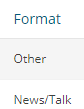
|
|
|
Station Language |
Main language station uses for broadcasts |
English, Spanish |
|
|
|
Station Language Code |
Two letter code for station’s language |
en, es |
|
|
|
Station Name |
Name of station in the Amperwave Console |
Report will Include “Station” when making this selection. “Station” is the ID number assigned to that station in the Amperwave Console |
|
|
|
Station Stream Name |
Name of the station stream itself |
account-stationnameaac-hlsc.m3u8, account-stationnamemp3-imc, account-stationnameaac-imc etc. |
|
|
|
Station TZ |
Time Zone where station is located geographically |
Listed either by Name: America/New_York, America/Los_Angeles or by time in relation to UTC: -04:00, -07:00 |
|
|
|
Station TZ Offset |
Time offset in relation to UTC |
Listed as a time in relation to UTC: -04:00, -07:00 etc. |
If a time relation to UTC is entered into Station TZ instead of a TZ Name, this field will return a +00:00 value. |
|
|
|
|
|
|
|
Filters - Most Dimensions are available as filters, those listed below are only available as Filters and not a Dimension. |
|
|||
|
Client IP |
IP Address of unique listener connection |
|
|
|
|
Client Fingerprint |
|
|
|
|
|
Client User Agent |
|
|
|
|
|
Log Timestamp (Epoch) |
|
|
|
|
|
Log Type |
Log type of impression |
Log type recorded by database |
fill.media.log, gatewayimpression.log, vader.unfilled.log, gateway.request.unfilled and more. |
|
Filter Properties |
||||
|
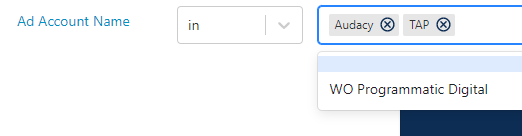
In |
Returns within the entered and selected words/ID/number/name |
|
|
|
|
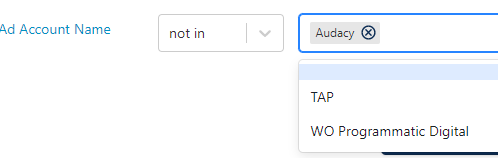
Not In |
Returns outside of the entered and selected words/ID/number/name |
|
|
|
|
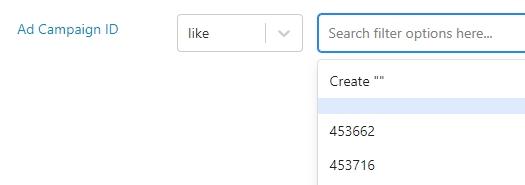
Like |
Similar to the entered and selected words/ID/number/name |
|
|
|
|
Not Like |
Dissimilar to the entered and selected words/ID/number/name |
|
|
|
|
> |
Returns amounts smaller than the entered and selected number |
|
|
|
|
< |
Returns amounts larger than the entered and selected number |
|
|
|
