Ad Break Templates
Ad break templates define the content and order of ad breaks, overriding the usual priority-based selection algorithms. These templates are then assigned to dayparts and stations using an ad break template schedule. Those stations will then use the templates for the days and times specified in the schedule.
Note: This feature must be enabled for the Break Management menu item to appear. Contact streamsupport@amperwave.com to enable this feature.
Content types include:
Content Type |
Where Defined and Creatives Uploaded |
Paid Ads |
|
Scheduled Fill |
|
Local Promos |
|
National Promos |
|
General Fill |
|
Sweepers |
|
Songs |
|
Audio Clips |
For example, a station might create an ad break template that looks like this:
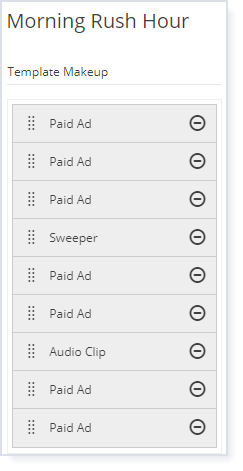
This template would attempt to play three paid ads, a sweeper, two more paid ads, an audio clip, and finally two paid ads.
Next, you could assign this template to dayparts like this:
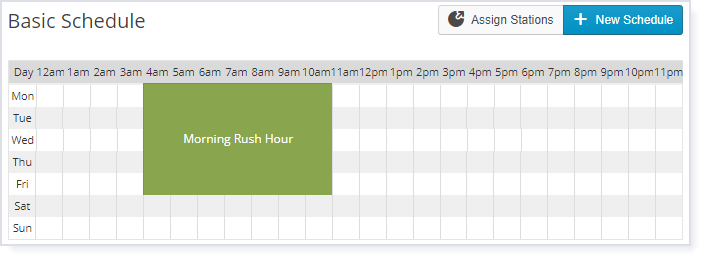
Each station that uses this schedule will use the Morning Rush Hour template for ad breaks from 4am to 11am, Monday through Friday.
Each ad break will start the template over again.
If the ad break is too short to play all entries in the template, the remaining ad slots will be skipped, and the next ad break will start over at the beginning of the template, with three paid ads.
If the ad break is still going on after the end of the template has been reached, AmperWave Streaming uses the normal priority-based system to determine the next item to insert. If there is no item to play for one of the slots, the system looks for something to play from the next slot.
•Creating an Ad Break Template
•Deleting an Ad Break Template